
Read Articles

This is default featured post 1 title

Go to Blogger edit html and find these sentences.Now replace these sentences with your own descriptions.

This is default featured post 2 title

Go to Blogger edit html and find these sentences.Now replace these sentences with your own descriptions.

This is default featured post 3 title

Go to Blogger edit html and find these sentences.Now replace these sentences with your own descriptions.

This is default featured post 4 title

Go to Blogger edit html and find these sentences.Now replace these sentences with your own descriptions.

This is default featured post 5 title

Go to Blogger edit html and find these sentences.Now replace these sentences with your own descriptions.

Showing posts with label Messenger and Chat. Show all posts

Friday, 4 May 2012

Google Talk in Blog


Google Talk is one of the most popular IM clients on  the Web. The Google Talk Widget for Blogger will help you in adding an elegant Google Talk badge to your Blogger / BlogSpot Blog.
The Google Talk Widget comes in 2 varieties. You can add any of these two widgets.Both of them are different and work differently :)

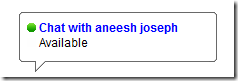
1.Google Chat Back Gadget – This gadget allows your visitors to IM you without revealing your Gmail address.you can chat with your blog visitors like what you normally do with your IM buddies. The only difference here is that your identity wont be revealed.

How to Install the Google Chat Back Gadget?

1. Login with your Google Account at Google Talk Badges
2.Copy the HTML Code generated by Google
3.Now login to your Blogger Account and Navigate to Layout > Page Elements Page
4.Click the Add Gadget Link and Opt to add an HTML/JavaScript Gadget
5.Paste the HTML code(that we copied) into the Gadget and Save it.
6.Now you should see the Google Chat Back Widget on your Blog’s sidebar.
Here is a Screenshot of what the Google Chat Back Widget will look like
image
2. Google Talk Gadget – This Gadget is just like the Google Talk Interface within your Gmail. This will allow your  blog visitors to login to Google Talk. It is better to say that, once you add this gadget, your blog can serve as a Google Talk IM Client. This Widget wont allow the visitors to chat with you. If the visitor logs into his Google Talk account(via this Google Talk Gadget), he will be able to chat with his Google Talk Buddies and not with you(the blog owner)unless you were already on his buddy list :)
You can add this Widget easily using this One Click Installer. It will Add the Widget to your Blog’s Sidebar.

Friday, 22 October 2010

AIM 7.4.5.12

Download AIM 7.4.5.12

AIM 7.4.5.12

America Online Inc - 7.19MB (Freeware)

The AIM® service is all about helping you keep in touch with your buddies. Whether you're sending IMs, sharing photos or doing a voice chat we want to make it better.
Features include:
  • Sleek new design: New buttons, new layout, new color, new brand! Tell us what you think of our shiny gold look and the new layout.
  • Profiles, profiles, profiles: Connect with your buddies like never before. Customize your profile, get updates from other social networks, and more. Now, you'll never miss an update on AIM.
  • Status messages in the IM.
  • :) Emoticons: You asked, we answered.
  • AIM Blast: IM your friends, coworkers, or customers all at once, and all from the convenience of your Buddy List.
  • More goodies: Sign in as invisible, Ctrl + F to search your Buddy List, Search the web from the IM window.

Windows Live Messenger 2011

Download Windows Live Messenger 2011

Windows Live Messenger 2011

Microsoft Corporation - 1.23MB (Freeware)


Windows Live Messenger makes it easier than ever to stay connected to the people you care about.
  • Favorites and groups - Put the people you chat with most at the top of your contacts, so you easily see when they're online. Want to chat with several people in one window? Just set up a group.
  • Share photos - Look at photos together, right in the conversation window. And Messenger tells you when people you know post new photos on Windows Live.
  • Customize - Show off your personal style with custom scenes, animated display pictures, and signature sounds.
  • Mobile and web - Using a public computer without Messenger? No problem! You can chat on the web from Windows Live Hotmail. Or, use Messenger on your mobile phone.
Get Messenger and stay in touch.

Skype 5.0.0.152

Download Skype 5.0.0.152

Skype 5.0.0.152

Skype Technologies - 19.85MB (Freeware)
Skype is software for calling other people on their computers or phones. Download Skype and start calling for free all over the world.
The calls have excellent sound quality and are highly secure with end-to-end encryption. You don't even need to configure your firewall or router or any other networking gear.
Additionally it doesn't just work on Windows. Skype is also for Mac OS X, Linux and PDAs using Pocket PC, with a native look and feel for each platform. Talking, sending instant messages or even file transfers work between different platforms like a charm.
  • Skype calling - Skype has all the features of an ordinary phone so it's even easier to manage your calls.
  • Video calling - see who you are talking to at the same time as speaking to them.
  • Add Skype and SkypeOut contacts - Add contacts who use Skype and those who use ordinary phones so you can call more people.
  • Organising groups - group contacts under certain names and share them with your contacts so they can talk to them too.
  • Basic chat and emoticons - when it's not convenient to call, chat or Instant Message (IM) your contacts.
  • Group chat - for when it's easier to chat or Instant Message (IM) all your friends at once.
  • Profile settings - change how you appear to the world and let people know a bit about you.
  • Conference calling - talk to more than one friend at a time.
  • Import contacts - search your address book to find friends and family that already have a Skype name and start calling them for free.
  • View Outlook contacts - view and call your Microsoft Outlook® contacts quickly and directly from your Skype contact list.
  • Quickfilter and Speed-Dial - find Skype contacts, recent chats and SkypeOut contacts quickly and easily, then enter their Skype name to call them back quickly.

Yahoo! Messenger 10.0.0.1270

Download Yahoo! Messenger 10.0.0.1270

Yahoo! Messenger 10.0.0.1270

Yahoo! Inc - 16.46MB (Freeware)
Keep friends at your fingertips with the new Yahoo! Messenger:
  • Easier ways to stay up to date - See more updates from your friends in the detailed Messenger list
  • Show off your status - Easily add links and emoticons to your status messages
  • Watch videos together - Share videos from popular sites and watch them with friends right in your IM window
Other features include:
  1. Instant message with one friend, or conference in a bunch
  2. Send text messages (SMS) to friends' mobile phones
  3. Join a chat room to meet new friends while you discuss your favorite topics
  4. Make free PC-to-PC calls and PC-to-phone calls for as low as 1¢ a minute (plus free voicemail!)
  5. Use the built-in media player to watch web videos and view photos with friends
  6. Show your style with emoticons, Avatars, audibles and IMVironments
  7. Share securely with automatic file scanning for users of Norton AntiVirus or Internet Security 2007/2008

free counters

Categories

Blog File Sharing Troubleshooting all Computer Troubleshooting How to Operating System Internet Maintanance and Repair ERROR Solutions Help Support Help and Support Device Manager Error Computer Windows Device Applications Install Java Script Computer Repair Java Programe Photoshop Add HTML facebook on site Computer Management Facebook and Site Messenger and Chat Protect Your Computer XFBML and HTML Facebook BELAJAR PHOTOSHOP Shortcut Startup Programs TUTORIAL PHOTOSHOP Windows Administration Tools Create DVD Create DVD Maker Keyboard Network Set Up Security Security System Test DVD Test DVD Drive VGA Card VGA Conector VGA Informations CA-CLIPPER INTERNAL ERROR Crack Create PDF Create PDF using Smart PDF Creator Error windows explorer Hard Drive Partitioning Intall Windows 7 Ultimates Internet Browser Local Area Network Networking PDF EDITOR Protect CD from Copy Router Smart PDF Creator Tutorial Java USB REMOVE Word Password Remover Access Media Collection Adsense Animator Anomymity Computer Hang Computer Icon Computer Set Up D-Link D-Link Router DNS DVD Drive DVD compress Device Drive partitions Drive parts Earn Money Easy Gif Animator Elastomer Eror Solution External Hard Drive Facebook Free Internet Hack Password Hard Drive How to Download Inside Adsense Internet Explore JPEG JPG GIF PNG BMP Laptop Laptop vs PC MS Word to PDF Make DVD Make Money with blog Make Your Own Copy-Protected CD with Passive Protection Modem Ms Word Applications Online Shoping PC Desktop PDF Remover Partitions drive Picture Prevent Windows XP Print Printer Error Reboot Application Remove Pasword Excel Restore Windows Registry Search Engines Optimizer Social Networking Solving Probelm System Registry Upload File to blogger Upload Files Virtual Memory is to Low Viture Windows 7 Windows DVD Maker Wireless Wireless router Words error intall windows explorer cannot open words documents cannot open

Share

Twitter Delicious Facebook Digg Stumbleupon Favorites More